

Data Dictionary Best Practices: Complete Reference for SQL Teams in 2026
A data dictionary is the foundation of effective data governance, ensuring every team member understands what data means, how it’s used, and who owns it. Best practices focus on clear definitions, complete metadata, consistent naming conventions, and continuous maintenance. For SQL teams managing PostgreSQL, MySQL, and SQL Server databases, automating documentation generation and establishing collaborative ownership prevents drift and builds a living source of truth across departments – enabling faster development, better data quality, and confident decision-making.
If you are starting from scratch, the foundational article on What is a data dictionary covers the core concepts before you apply these practices.
Table of contents
- What Is a Data Dictionary?
- Core Best Practices for Data Dictionary Success
- What Should Your Data Dictionary Include?
- Writing Effective Definitions for Data Teams
- Ownership, Version Control, and Maintenance
- Implementing Best Practices: Data Quality and Governance
- Common Mistakes and How to Avoid Them
- Frequently Asked Questions
What Is a Data Dictionary?
A data dictionary is a centralized repository that defines every data element in a system: what it represents, how it is structured, what values it accepts, and who is responsible for it. It serves as the authoritative reference that bridges the gap between raw database schemas and the business meaning those schemas encode.
Definition and purpose
At its most basic level, a data dictionary answers five questions about each field in your database. Harvard’s biomedical data management program frames these as: What is it? What does it mean to the business? What values can it contain? How is it produced or calculated? Who is responsible for it? These five questions form the minimum contract between your data and the people who rely on it.
The dictionary does not replace your schema – it annotates it. Where your schema tells a database engine that order_status is a VARCHAR(20), a data dictionary tells your analyst that it accepts exactly four values (pending, confirmed, shipped, cancelled), that pending orders older than 72 hours trigger an escalation rule, and that the Customer Operations team owns the definition.
Why data dictionaries matter for your organization
Without a shared reference, different teams build conflicting understandings of the same data. A developer calls a column cust_id; a business analyst refers to it as “Account Number”; a support agent calls it “Customer Reference.” Each is correct in their own context – but without documentation linking these together, onboarding takes longer, queries return unexpected results, and governance audits become painful. A well-maintained dictionary eliminates this ambiguity and provides the consistent terminology that sound data governance requires, as noted in data governance research: dictionaries enforce governance policies, prevent unauthorized schema changes, and support compliance requirements.
Core Best Practices for Data Dictionary Success
Building a dictionary that teams actually use requires more than listing column names and types. Four practices determine whether a dictionary becomes a genuine source of truth or an abandoned document.
Define every data element with complete clarity
Every field entry should stand on its own. A definition like “the date” is not a definition – it forces the reader to infer context from the column name alone, which defeats the purpose. A complete definition states what event or state the date captures (order_created_at = the UTC timestamp when the order record was first inserted by the checkout service), the system that generates it, and any caveats (for example, records migrated before a certain cutoff carry a placeholder value).
Separate business, technical, and operational metadata
A single data element carries three distinct layers of information, and conflating them makes the dictionary harder to use. Vassar College’s data governance framework defines these layers precisely: Business metadata covers the definition, owner, sensitivity classification, and business rules. Technical metadata covers data type, length, database location, constraints, and foreign key relationships. Operational metadata covers refresh frequency, last update timestamp, and quality metrics. Business users need the first layer; engineers building pipelines need the second; data stewards monitoring quality need the third. Separating them means each audience can navigate to the information they need without wading through irrelevant detail.
Establish consistent naming conventions across systems
Naming conventions are the grammar of your data model. The USGS data management guidelines recommend adopting either snake_case or camelCase consistently across all tables, using singular names for entity tables, and applying standardized suffixes: _id for primary and foreign keys, _date for calendar dates, _timestamp for datetime values, _amount for monetary figures, and _count for integer tallies. The rule against unexplained abbreviations is equally important – cust_ltv_amt carries meaning only if every team member knows the abbreviation table. When in doubt, spell it out.
Document valid values, codes, and constraints
Columns that accept a bounded set of values are among the most error-prone fields in any system. A dictionary entry for an enumerated column should list every valid value, its business label, and a plain-language description of what it represents. Constraints matter too: a NOT NULL field with no default has different failure modes than a nullable field. Documenting these prevents data entry errors, guides developers writing validation logic, and helps analysts write queries that account for every case.
What Should Your Data Dictionary Include?
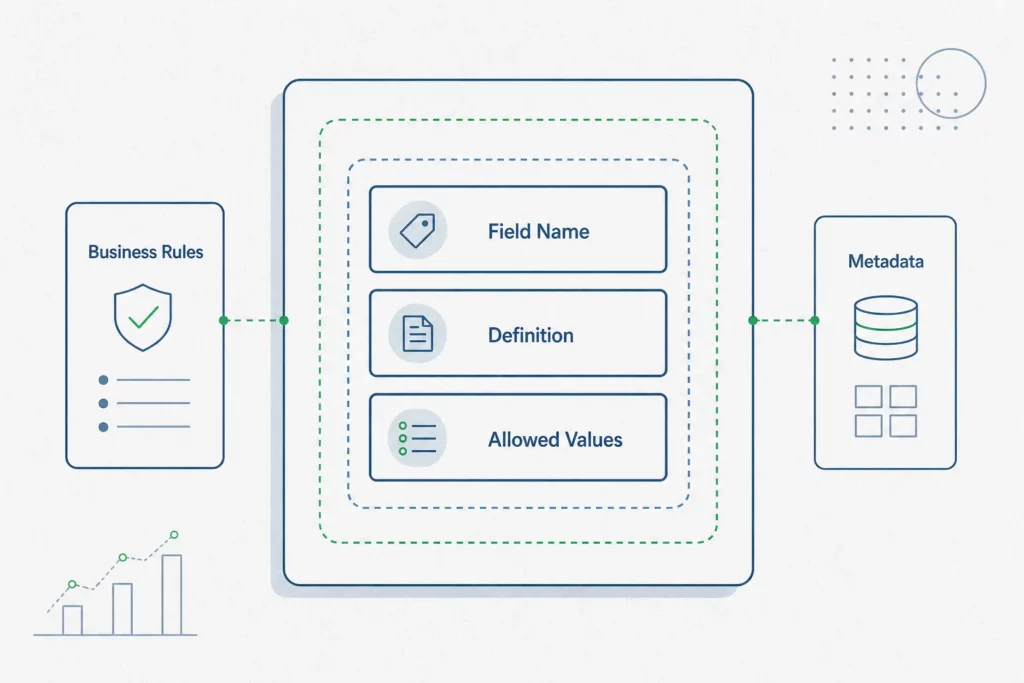
The fields you include determine how useful the dictionary is across different contexts and teams.
Essential metadata structure and fields
According to California’s Open Data publisher guidelines, a dictionary entry should document at minimum: field name, business label, definition, data type, format, nullability, allowed values, an example, the source system, and the data owner or steward. This ten-field baseline covers both the technical and business layers, giving developers and analysts what they need without requiring a lengthy authoring process for each field.
Comparison: minimum vs. comprehensive dictionaries
A minimum viable dictionary gets teams unblocked quickly. A comprehensive dictionary serves compliance, auditing, and cross-system integration. The difference lies in depth rather than structure: a minimum entry defines what a field is; a comprehensive entry also documents why it exists, what business process created it, how it relates to fields in other tables, its lineage, and its quality score. Teams starting from scratch should target the minimum baseline and expand entries as understanding matures, rather than delaying publication until every field has a complete record.
Template table: required fields and examples
The table below illustrates how a minimum dictionary entry looks for a common SQL field:
| Field | Example value |
|---|---|
| Field name | customer_status |
| Business label | Customer Account Status |
| Definition | Current lifecycle stage of the customer account |
| Data type | VARCHAR(20) |
| Nullable | No |
| Allowed values | active, inactive, suspended, closed |
| Example | active |
| Source system | CRM application |
| Owner / Steward | Customer Success team |
Writing Effective Definitions for Data Teams
The quality of a data dictionary is determined almost entirely by the quality of its definitions. A well-structured entry with a vague definition is still useless.
Business definitions vs. technical specifications
Business definitions and technical specifications serve different readers and should be written separately. A business definition explains what the field means in operational terms – “Revenue recognized in the billing period, net of refunds and discounts, in USD” – without referencing implementation details. A technical specification documents data type, constraints, the originating stored procedure, and the transformation applied. Mixing them produces entries that are too technical for business users and too imprecise for engineers.
Handling NULL values, missing data, and edge cases
NULL is one of the most misunderstood values in SQL databases, and a dictionary that ignores it creates silent analytical errors. Each nullable field should explicitly document what NULL means in context: does it indicate the data was never collected, that the event has not yet occurred, or that the value is genuinely unknown? A field like shipped_at being NULL may mean the order is not yet shipped or that it was fulfilled through a channel that does not report timestamps. Both scenarios require different handling in downstream queries, and only the dictionary can clarify the distinction.
Documenting derived fields and calculations
Calculated fields and derived columns carry hidden logic that can silently change when underlying fields are modified. The dictionary should document the formula in plain language alongside the SQL expression, reference every input field the calculation depends on, and note any business rules that govern edge cases (for example, how the formula handles returns or negative adjustments). This makes the field auditable and ensures that changes to input fields trigger a review of affected derived columns. For a broader view of how to document a database including views and stored procedures, a structured documentation approach applies the same principles at scale.
Ownership, Version Control, and Maintenance
A data dictionary without governance is a document that decays. The practices in this section determine whether your dictionary remains trustworthy as systems evolve.
Assigning data ownership and stewardship
Every field in the dictionary should have a named owner – a person or team accountable for keeping the definition accurate. Data stewardship does not require technical expertise; it requires domain knowledge. A Customer Operations team is better positioned to own the definition of order_status than the engineering team that maintains the table. Ownership should be recorded in the dictionary itself, making accountability visible and ensuring that when a field changes in the source system, there is a clear person to notify.
Keeping your dictionary current as systems evolve
Schema drift is the most common cause of dictionary failure. As OvalEdge’s research on data dictionary maintenance confirms, without version control, a regular review cadence, and automated metadata syncing, dictionaries diverge from source systems and lose the trust of the teams that depend on them. The answer is not more documentation ceremonies – it is automation. Tools that connect directly to your database schemas and surface changes when columns are added, renamed, or deprecated make it possible to keep documentation current without relying solely on manual updates.
Preventing data dictionary drift
Drift happens incrementally. A column is renamed in a migration and no one updates the dictionary. A new nullable field is added without a definition. An enumerated value is retired but still appears in the allowed values list. Over time, these small gaps compound into a dictionary that developers distrust and business users stop consulting. The solution is to make documentation updates part of the same workflow as schema changes – not a separate task scheduled for later. Linking database relationship diagrams to dictionary entries provides an additional visual check that structural relationships match documented intentions.
Implementing Best Practices: Data Quality and Governance

Data dictionaries are not passive reference documents – they are active governance instruments that shape how data is collected, validated, and used across the organization.
Data quality rules and validation thresholds
Each field entry can carry machine-readable quality rules: NOT NULL constraints, regex patterns for formatted fields like email addresses or phone numbers, referential integrity rules linking foreign keys to parent tables, and acceptable value ranges for numeric fields. When these rules are documented alongside the field definition, quality checks can be generated automatically from the dictionary rather than handcrafted in validation pipelines. This makes the dictionary both descriptive and prescriptive.
Governing access and maintaining accuracy
A dictionary that anyone can edit without oversight will accumulate conflicting definitions. A dictionary that only specialists can edit will fall behind. The right balance is a contribution model where any team member can propose changes, but a designated steward approves updates to definitions, ownership, and business rules. Change history should be visible – knowing when a definition changed and who approved it is as important as knowing what the current definition says, particularly for regulated data.
Integration with your broader data strategy
A data dictionary is most powerful when it connects to the rest of your data infrastructure. Definitions documented in the dictionary should align with the terminology used in reports, dashboards, and cross-functional communications. When the dictionary serves as the single reference that everyone – developers, analysts, product managers, and support teams – consults to resolve disagreements about data meaning, it fulfills its governance role. SQL teams working across PostgreSQL, MySQL, and SQL Server can particularly benefit from a single dictionary that abstracts platform-specific syntax differences behind shared business definitions.
Common Mistakes and How to Avoid Them
Several patterns consistently undermine data dictionary efforts, and recognizing them early saves significant rework.
The most damaging mistake is treating the dictionary as a one-time deliverable. A dictionary written during a project kickoff and never updated becomes outdated within weeks as the schema evolves. This is the central insight that separates teams with effective documentation from those with abandoned wikis: the goal is not perfect documentation on day one, but a documentation system that stays synchronized with your actual schema as it evolves.
A second common failure is prioritizing completeness over accuracy. A dictionary with 500 fields, half of which have stale or incorrect definitions, is worse than a dictionary with 200 accurate entries. Inaccurate documentation actively misleads analysts and creates errors in downstream systems. Start with the fields teams use most frequently, document them well, and expand from there.
A third mistake is writing definitions for a single audience. A definition written entirely in technical terms excludes business stakeholders; a definition written entirely in business language leaves engineers without the implementation details they need. The three-layer metadata approach – business, technical, and operational – solves this directly.
Finally, skipping naming conventions because they feel like overhead creates compounding problems as the schema grows. Inconsistent naming forces every new team member to reverse-engineer meaning from column names, making the dictionary harder to maintain and queries harder to write. Establishing conventions early, even a simple set of rules, pays dividends across the lifetime of the system.
Frequently Asked Questions
What should be included in a data dictionary?
At minimum, each entry should document the field name, a business label, a plain-language definition, data type, format, nullability, allowed values, a representative example, the source system, and the data owner or steward. Mature dictionaries add sensitivity classification, lineage, quality metrics, and the business rules governing how the field is populated and used.
How do I create an effective data dictionary?
Start by connecting to your existing database schema to extract field names and technical metadata automatically – this eliminates the blank-page problem. Then layer in business definitions by involving domain experts, not just engineers. Assign ownership to each field, establish a naming convention for any new fields, and set a review cadence that aligns with your release cycle. Automate as much of the synchronization as possible so updates to the schema surface in the dictionary without manual intervention.
What is the difference between a data dictionary and a business glossary?
A business glossary defines business terms and concepts – “Customer,” “Active Contract,” “Churn” – independent of any specific database field. A data dictionary defines specific data elements as they exist in a system, with technical metadata attached. The two complement each other: the glossary establishes shared business vocabulary, while the dictionary maps that vocabulary to concrete fields, types, and constraints. Many organizations maintain both and link glossary terms to the dictionary entries that implement them.
How often should you update your data dictionary?
Updates should be triggered by schema changes, not by a calendar. Every time a column is added, renamed, deprecated, or has its allowed values changed, the dictionary entry should be reviewed within the same sprint or release cycle. Beyond event-driven updates, a quarterly review of high-priority tables – those that feed reports, drive operational decisions, or carry regulated data – catches drift that slips through change management processes.
Why is a data dictionary important for data governance?
Data governance depends on consistent, shared definitions of what data means and who is responsible for it. Without a dictionary, governance policies exist in isolation from the data they govern. The dictionary makes governance operational by attaching rules, ownership, and sensitivity classifications directly to the fields they apply to. It also provides an audit trail: when a compliance question arises about how a field was defined or who approved a change, the dictionary is the authoritative record.
How do you prevent data dictionary drift?
Drift prevention requires three things working together: automated schema synchronization that detects when source systems change, a clear ownership model so there is always a named person responsible for each entry, and a contribution workflow that makes updating the dictionary the path of least resistance rather than an afterthought. Manual-only documentation processes will always lag behind fast-moving schemas. Connecting your documentation layer directly to your live database schemas – as SQLInfo does for PostgreSQL, MySQL, and SQL Server – means changes surface automatically rather than silently accumulating into gaps.